
en:tab_event
System Options - Tab |Event|
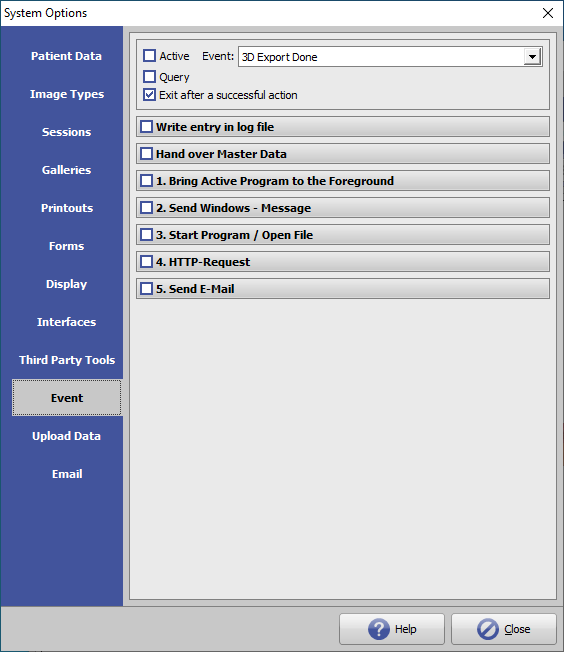
On system options tab |Event|, reactions to internal application events can be configured.
[Click on tab to switch to related topic]
Events
| Specifier | Occurrence |
| 3D Export Done | after exporting a 3D dataset as .STL, .OBJ, etc. |
| 3D Series Export Done | after 3D series export was finished etc. |
| Container Export Done | after creating a container |
| Container Import Done | after importing a container |
| Container Upload Done | after uploading a container to an FTP server |
| Evaluation Done | after the evaluation of a finding in the Digitize module |
| Image Import Done | after the transfer of a 3D or 3D dataset into the database |
| Module Closed | after a module has been closed |
| Module Opened | after a module has been opened |
| Project Saved | after the creation of a project |
| Report Export Done | after a report has been created and saved |
| Report Upload Done | after uploading a report to a server |
| Tooth Movement Saved | after saving the tooth movements in the Aligner module |
| Treated Image Saved | after saving a result As Findings |
| User Login | after a user has logged in |
| User Logout | after a user has logged out |
| Web Export Done | after exporting a 3D web view |
In the events Mergefields are supported.
Options
If the option [X] Query is active, the user is asked whether the actions for the event are to be carried out.
| Write entry in log file |
| Hand over Master Data |
| 1. Bing Active Program to the Foreground |
| 2. Send Windows-Message |
| 3. Start Program / Open File |
| 4. HTTP Request |
| 5. Send email |
If the option [ ] Exit after a successful action is not active, all active actions are executed.
If the option is active, processing is terminated starting with 1. after the first active and successfully executed action.
en/tab_event.txt · Last modified: 2022/06/24 13:33 by onyxadmin